
Restaurant customer accounts
Make Repeat Restaurant Orders Fast and Familiar.
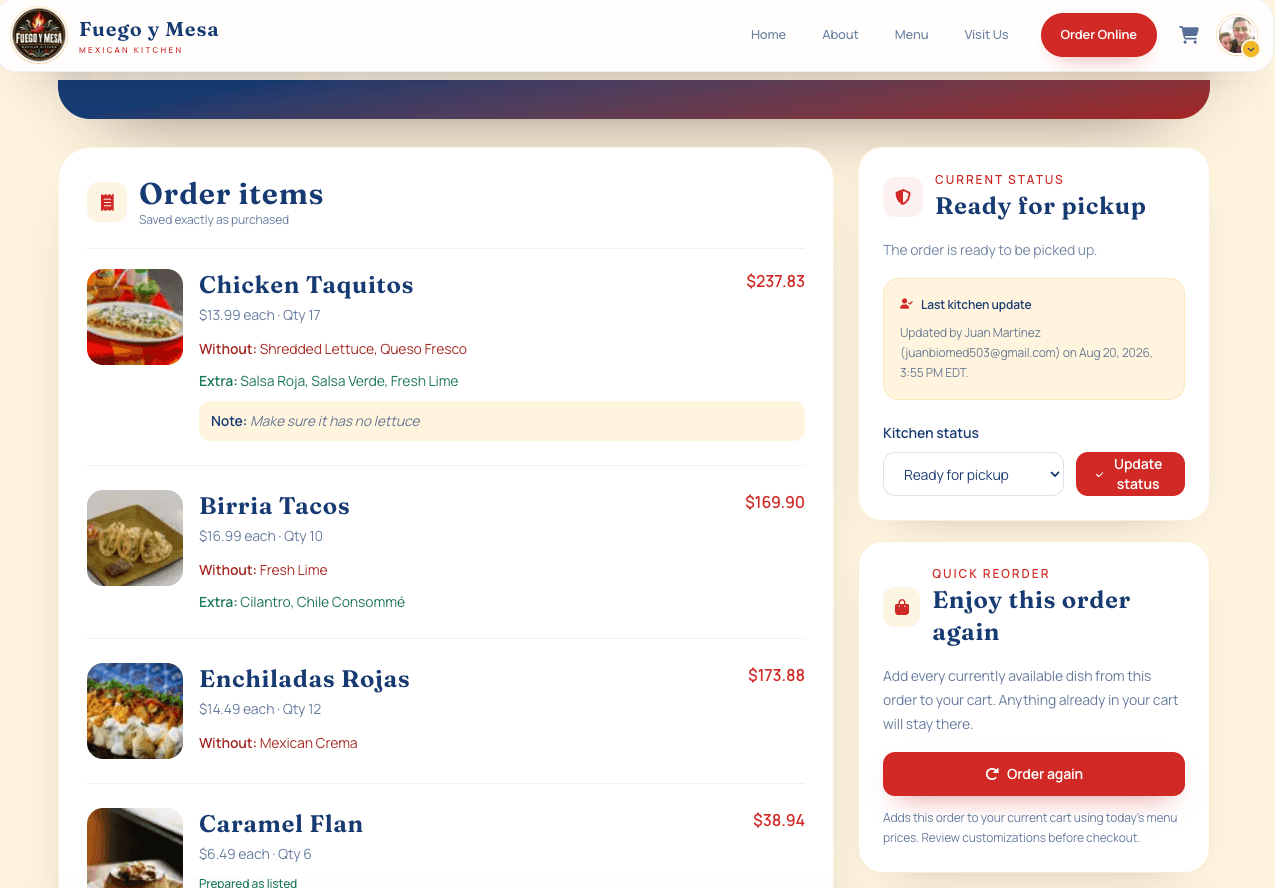
Returning customers can sign in, review their previous orders, and quickly rebuild an order they already enjoyed—all through the restaurant’s own website.
- Customer accounts and Google sign-in
- Private past-order history
- Fast reordering from a previous order
Included with every plan
What is included
A smoother experience for returning customers.
Repeat ordering should remove steps, not add new ones. Customer accounts connect identity, order history, and reordering while keeping owner tools and other customers’ information separate.
Flexible sign-in
Customers can create an account or use Google sign-in to access their restaurant ordering history more quickly.
Private order history
Signed-in customers see their own past orders and order details—not owner dashboards, analytics, or another guest’s account.
Easy reordering
Use a previous order as the starting point for the next one so familiar selections do not have to be rebuilt from memory.
Connected order updates
Keep the customer experience tied to the order with status information and automated SMS updates from the restaurant’s dedicated local number.
Built for the next order
Reduce the effort between remembering a favorite and ordering it again.
A restaurant reorder system is most useful when it supports a behavior customers already have: returning for the same meal or a familiar variation. Past-order details create a clear reference point and make the next purchase easier to begin.
The account is part of the restaurant’s branded ordering experience rather than a claim that every customer needs a complex loyalty profile. Exact sign-in and account requirements are confirmed during setup so access matches the live restaurant experience.
Less repeated searching
Let returning guests find a prior order instead of navigating the entire menu again.
A familiar direct channel
Give customers a reason to return to the restaurant’s own website.
Clear customer boundaries
Separate each guest’s private history from restaurant administration and analytics.
Connected communication
Support the order journey with clear status details and configured notifications.
How it works
Connect accounts to the ordering experience.
Account access, order history, and reordering are verified as one customer journey, including the cases where menu details have changed since an earlier purchase.
- 01
Set account access
Configure account creation, sign-in, Google authentication, and the customer-facing account area.
- 02
Connect order history
Associate completed orders with the correct customer so previous details remain easy to review.
- 03
Verify reordering
Test how available past items and options return to the cart and how changed menu choices are handled.
- 04
Protect role boundaries
Confirm customers see only customer information while authorized restaurant roles receive the correct management access.
Accounts + easy reordering FAQ
Straight answers before you decide.
Clear scope and practical boundaries, with no promises about results that depend on Google, payment providers, or other third parties.
Related restaurant services
Keep the whole customer and owner experience connected.
- Direct ordering + paymentsA branded menu, item customization, cart, and secure Stripe checkout (credit/debit cards, Apple Pay, Google Pay, Cash App Pay, and Link where available) with 0% Web Studios sales commission.
- Owner dashboard + analyticsManage orders, roles, and refunds while understanding revenue, customers, menu performance, demand, and fulfillment.
- Managed after launchHosting, maintenance, updates, a dedicated local SMS number, and direct support in English or Spanish.
Evansville-based, serving restaurants nationwide.
Work directly with a software engineer in English or Spanish, in Southern Indiana or anywhere in the United States.
See how this service fits your restaurant.
Try the customer and owner experience, or start a focused conversation about your current website and ordering process.