Ask in your own words
Type a question or start from a suggested one, such as how the business is doing, what changed from the previous period, or what to do this week.

The Analytics Assistant lives inside the owner dashboard. Choose the last 7, 30, or 90 days, ask what you would ask a sharp business analyst, and get a plain-English answer with practical next steps. It is powered by Anthropic’s Claude models, grounded in your restaurant’s paid online orders, and visible only to the owner.
Included with every plan
Website, ordering, owner tools, hosting, and support work as one managed restaurant platform.
Dashboards show numbers. Owners usually want to know what the numbers mean and what to do about them. The assistant turns your order data into direct answers, so you do not have to read every chart to find the point.
Type a question or start from a suggested one, such as how the business is doing, what changed from the previous period, or what to do this week.
Answers draw on your restaurant’s paid online-order analytics for the selected window, not generic restaurant advice.
Get suggestions on staffing and prep, bundles and add-ons to test, bringing customers back, and how to read refund and fulfillment signals.
The assistant sits inside the owner experience. Customers never see it, and it is not part of the customer account area.
The assistant is built to be useful and careful at the same time. It leads with the answer, cites the figures behind it, and tells you when the data is too thin to trust a conclusion.
Start with one tap: a quick business summary, what changed and why, busiest days and hours, top and weakest menu items, bundle ideas, customer loyalty, refunds and fulfillment, and a top-three list for the week.
Match the question to the time frame. Look at this week, the last month, or the last quarter, and the answer reflects that window.
Answers cite sales, share of sales, units, and order counts so you can verify each claim against the dashboard.
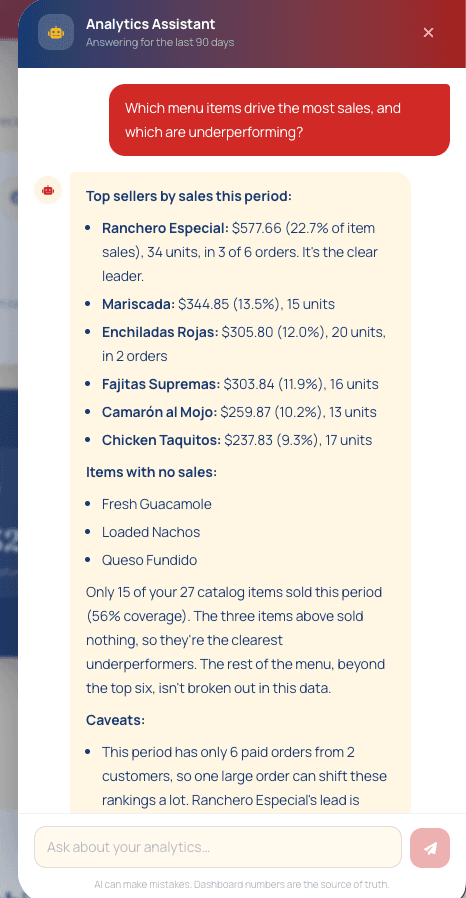
When there are only a few paid orders, the assistant says so. One large order can shift rankings a lot, and it will tell you.
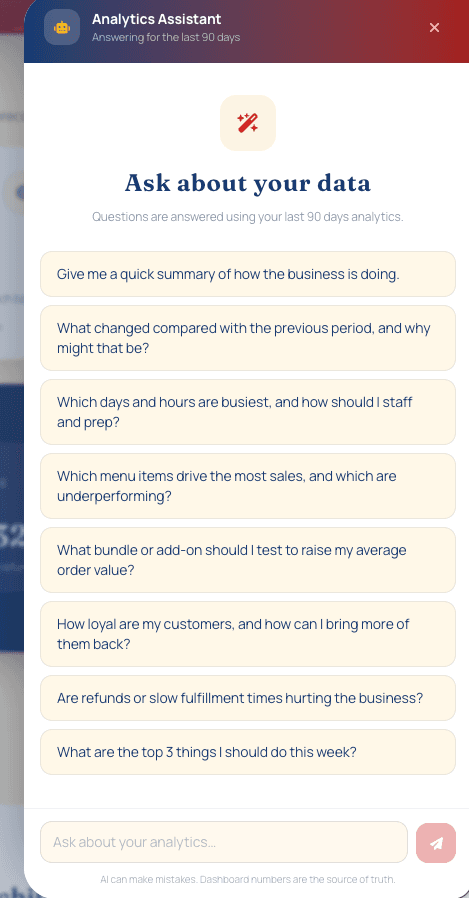
Open the assistant from the owner dashboard and pick a starting point, or type your own question about the selected reporting window.
Here the assistant ranks top sellers by sales and share, flags menu items with no sales, and warns that a small number of orders can skew the ranking.
Most restaurant owners do not have time to study charts between lunch and dinner service. A good question and a clear answer can be faster: which items are carrying the menu, which are not selling, when to staff up, and what to test next to raise the average order.
AI can make mistakes, so the assistant is presented as a guide rather than an authority. Every answer is built from the same paid online-order data as the dashboard, the interface reminds the owner that dashboard numbers are the source of truth, and the assistant is expected to flag small samples and missing data instead of overstating a conclusion.
Skip the chart hunt and get to the answer, then confirm it on the dashboard.
Get explanations and next steps written for a busy owner, not for a data team.
Use your restaurant’s own sales, menu, and customer behavior as the starting point.
Keep business insight in the owner experience, separate from customers and their accounts.
The assistant is part of the owner analytics experience, so there is no separate tool to buy, learn, or connect.
Direct online orders are recorded in the restaurant’s platform and feed the owner analytics.
The owner chooses the last 7, 30, or 90 days to match the question.
The owner types a question or taps a suggestion, and Claude answers from that period’s analytics.
The owner checks the figures on the dashboard and decides what to change, test, or ignore.
Clear scope, practical boundaries, and no claims that a website or search provider cannot honestly guarantee.
It is a chat assistant inside the owner dashboard. Owners ask questions in plain language, such as which menu items sell best or what to do this week, and it answers using the restaurant’s order analytics for the selected period.
The assistant is powered by Anthropic’s Claude models. Web Studios builds the restaurant-specific experience around them: the owner-only interface, the question prompts, and the connection to the restaurant’s analytics.
Owners can choose the last 7, 30, or 90 days. The assistant states which period it is answering for, and comparisons with the previous period are available for questions about what changed.
Only the restaurant owner. It is not shown to customers, and it is not part of the customer account area.
Yes. AI can make mistakes, which is why the assistant shows a reminder that dashboard numbers are the source of truth. Answers cite figures so they can be checked, and a small number of orders can make any ranking unreliable.
It uses paid online orders recorded in the Web Studios platform, the same data behind the owner dashboard. Dine-in sales, marketplace orders, food cost, and labor are not included unless an outside integration is separately scoped.
Yes. The live demo uses test data, and every demo account receives owner access, so you can open the Analytics Assistant and ask it questions yourself.
Manage orders, roles, and refunds while understanding revenue, customers, menu performance, demand, and fulfillment.
Explore this serviceA branded menu, item customization, cart, and secure Stripe checkout (credit/debit cards, Apple Pay, Google Pay, Cash App Pay, and Link where available) with 0% Web Studios sales commission.
Explore this serviceHosting, maintenance, updates, a dedicated local SMS number, and direct support in English or Spanish.
Explore this serviceWork directly with a software engineer in English or Spanish, in Southern Indiana or anywhere in the United States.
Try the customer and owner experience, or start a focused conversation about your current website and ordering process.